After 3 months of work from LDTP 1.3.0 release, we are pleased to announce LDTP 1.4.0. Special thanks to Guofu Xu of Access Company (Palm Source).
Major things about this release:
* New API's required for VMware Workstation automation, thanks to Arvind Patil, Anupa Kamath
* Performance enhancement patches, thanks to Guofu Xu
* LDTP editor now supports configuration file for settings, thanks to Shreyank Gupta
* LDTP is now packaged for Fedora 10, thanks to Debarshi Ray
Thanks to Ara Pulido and Marc Tardif of Ubuntu for reportings bugs in LDTP.
More news to follow ;-)
Saturday, December 6, 2008


Wednesday, October 22, 2008
VMware workstation automated test using LDTP
Its a pleasure to announce this news !!! VMware Workstation and Player on Linux are now automated using Linux Desktop Testing Project (LDTP). We have approximately 700 test scripts running twice a week on RHEL5.x / Ubuntu 8.04 host (both 32 and 64 bit hardware). Need to add SLED10 host in the list. In the guest matrix, we run the test on RHEL5.x / SLED10 / Ubuntu 7.04 / Ubuntu 8.04 / Win2K (both 32 and 64 bit VMs).
Tuesday, October 21, 2008
Ubuntu automation test using LDTP
Its a pleasure to announce this news !!! Ubuntu QA team is using Linux Desktop Testing Project (LDTP) to test the package manager and other GNOME applications.
Ara Pulido is the main developer from Ubuntu, who has developed the framework on top of LDTP to test the GNOME applications in Ubuntu environment.
For more info, check out here
Ara Pulido is the main developer from Ubuntu, who has developed the framework on top of LDTP to test the GNOME applications in Ubuntu environment.
For more info, check out here
Thursday, September 4, 2008
Announce: Linux Desktop Testing Project 1.3.0 released
Cool new features "Generation of OO based LDTP code" and "Generation of * in window title" by Shreyank Gupta. Both the features were implemented in LDTP Editor code base. Thanks for his contribution.
Other interesting things to share about this release:
* Ubuntu QA team has adopted LDTP as their testing tool. Thanks to Ara and his team members, supporting LDTP, with good number of bug reports and feature suggestions :)
* VMware Workstation and Player automation are done using LDTP ! Thanks to Shang Wang, Gaurav Sharma, Ranjith Murugan for their contributions
* From IBM, Germany, Philipp Wagner has filed couple of intersting bugs, which were very critical. With his reports, he was able to automate Thunderbird, Gantt chart using LDTP.
Thanks to Kartik Mistry for updating the Debian packages, Ara Pulido and his team for updating Ubuntu packages, Navtej Singh for updating Gentoo packages.
You can download binary / source code from here
Supported binaries: RHEL5.x - CentOS 5.x - Ubuntu 7.04/7.10/8.04 - OpenSuSE 10.2/10.3/11.0/Factory - SLE10 - Fedora 8/9 - Madriva 2007/2008 - Debian Etch. Credit goes to OpenSuSE build service team !!!
Other interesting things to share about this release:
* Ubuntu QA team has adopted LDTP as their testing tool. Thanks to Ara and his team members, supporting LDTP, with good number of bug reports and feature suggestions :)
* VMware Workstation and Player automation are done using LDTP ! Thanks to Shang Wang, Gaurav Sharma, Ranjith Murugan for their contributions
* From IBM, Germany, Philipp Wagner has filed couple of intersting bugs, which were very critical. With his reports, he was able to automate Thunderbird, Gantt chart using LDTP.
Thanks to Kartik Mistry for updating the Debian packages, Ara Pulido and his team for updating Ubuntu packages, Navtej Singh for updating Gentoo packages.
You can download binary / source code from here
Supported binaries: RHEL5.x - CentOS 5.x - Ubuntu 7.04/7.10/8.04 - OpenSuSE 10.2/10.3/11.0/Factory - SLE10 - Fedora 8/9 - Madriva 2007/2008 - Debian Etch. Credit goes to OpenSuSE build service team !!!
Wednesday, July 9, 2008
Announce: Linux Desktop Testing Project 1.2.0 released
Highlights of this release
* Performance fix, which improves the LDTP execution time drastically
* 3 crasher fixes in LDTP execution engine
* LDTP editor bug fixes reported by Shreyank Gupta
* Added 2 new API required for VMware Workstation automation
* API manual is updated
* Moved from CVS to GIT - Thanks to FreeDesktop administrators
* Thanks to Ubuntu automation team for using / evaluating LDTP
* LDTP is being evaluated by the project Open Source based Desktop Benchmark of the Linux Solutions Group e.V. (LiSoG) in Germany, Switzerland and Austria
Download source
* Performance fix, which improves the LDTP execution time drastically
* 3 crasher fixes in LDTP execution engine
* LDTP editor bug fixes reported by Shreyank Gupta
* Added 2 new API required for VMware Workstation automation
* API manual is updated
* Moved from CVS to GIT - Thanks to FreeDesktop administrators
* Thanks to Ubuntu automation team for using / evaluating LDTP
* LDTP is being evaluated by the project Open Source based Desktop Benchmark of the Linux Solutions Group e.V. (LiSoG) in Germany, Switzerland and Austria
Download source
Monday, February 25, 2008
Announce: Linux Desktop (GUI Application) Testing Project - LDTP 1.0.0 release
New features of this release:
* Object Oriented LDTP (Documentation will be published soon)
* LDTP Editor (Record / Playback). Again documentation on the way. For now you can refer Record HOWTO.
Credits:
* Prasad of Evolution team. He has tested LDTP editor extensively and reported all the issues, he faced.
* LDTP editor initial code contributed by Thanumalayan and Vinod Kumar.
Source / Binary (OpenSuSE 10.2, 10.3, Factory, Fedora 6, 7, 8, RHEL 5, CentOS 5 - x86 / x86_64)
More updates soon.
* Object Oriented LDTP (Documentation will be published soon)
* LDTP Editor (Record / Playback). Again documentation on the way. For now you can refer Record HOWTO.
Credits:
* Prasad of Evolution team. He has tested LDTP editor extensively and reported all the issues, he faced.
* LDTP editor initial code contributed by Thanumalayan and Vinod Kumar.
Source / Binary (OpenSuSE 10.2, 10.3, Factory, Fedora 6, 7, 8, RHEL 5, CentOS 5 - x86 / x86_64)
More updates soon.
Tuesday, November 13, 2007
Linux Desktop Testing Project editor
A nice post by Hari, Thanks for your nice post.
Want to use LDTP to test your application? Or do you want to automate the actions you do often? Or are you a GNU/Linux user who want to show “magic” to your friends by recording your actions and playing them back? You can use LDTP for this. But one small issue with LDTP is that you should know the LDTP Python API to write any test suite. But with the new LDTP Editor, this makes your job really simple. A screenshot of the LDTP Editor is shown below.
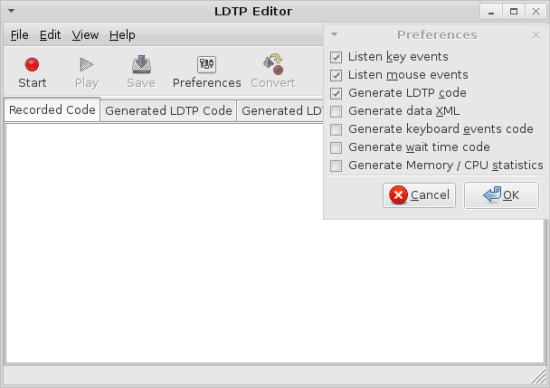
This is a simple HOWTO for recording and playing back the recorded script.
Installing LDTP.
- Download the lastest LDTP source code from http://people.freedesktop.org/~nagappan/ldtp-0.9.2.tar.gz.
- Uncompress the file.
- Compile the code using ./configure and make
- If you don’t have the access to install softwares, run the ldtpeditor file in the python folder
- If you have access to install softwares, then run “make install”
Note:: After installing LDTP Editor, i when i tried to run ldtpeditor, got an error saying
hari@hari-laptop:~/ldtp/ldtp-0.9.2$ ldtpeditor
(ldtpeditor:11130): libglade-WARNING **: could not find glade file '/usr/share/local/ldtp/glade/ldtpeditor.glade'
Glade file not found
The ldtpeditor.glade file is present in the python folder. I got this error because i compiled the code as ./configure. If i had done it as ‘./configure –prefix=/usr’, then i wouldn’t have got this error. Anyway i copied the file manually to that folder.
hari@hari-laptop:~/ldtp/ldtp-0.9.2$ sudo mkdir -p /usr/share/local/ldtp/glade/
hari@hari-laptop:~/ldtp/ldtp-0.9.2$ sudo cp python/ldtpeditor.glade /usr/share/local/ldtp/glade/
hari@hari-laptop:~/ldtp/ldtp-0.9.2$ ldtpeditor
After that when i ran ldtpeditor, it ran without any issues.
Recording using LDTP Editor
For this let us consider recording the actions performed in gcalctool.
- First make sure Assistive Technology is enabled in your desktop. If you are not sure about this, open gnome-control-center and in that open Assistive Technology Preferences. You should have Enable Assistive Technologies checked to use LDTP.
- If you are enabling Assistive Technology only now, logout and login again.
- Run ldtpeditor and gcalctool.
- Make sure both you have enabled ‘Always on Top’ or both the applications and both the window doesn’t overlap with each other.
- Click the Start button the LDTP Editor. All actions performed after this are recorded.
- Perform actions in the gcalctool. Check out this video to see the actions i recored in my computer .
- After you’re done with the actions in the gcalctool, click the Stop button in the LDTP Editor.
- You can see that the ‘Recorded Code’ tab is updated with code as when you perform actions in gcalctool.
- Click the convert button in the LDTP Editor. You’ll see that the Generated LDTP Code and Generated LDTP XML tabs are filled with generated code.
- The Play button is not working now. I wrote the patch for that yesterday night ;-).
- Save the contents of the ‘Generated LDTP Code’ into a python file (for ex frisco.py) . Note that if the file name you specify already exists, then it OVERWRITES the filename without any warning.
- Then run
hari@hari-laptop:~$ python frisco.py - The actions you performed while recording will be played back again :-)
Currently the Play button in the LDTP Editor is not enabled. But you can make it work by applying the patch mentioned below. I guess this patch will be added to LDTP Editor in a week or so. So check the ChangeLog file before applying the patch.
LDTP Editor Preferences
Using the LDTP Prefereces, you can control what all actions you can control. A brief summary about the options given in the Preferences window.
- Listen key events
This option is not yet implemented. Checking/Unchecking this doesn’t make any difference now. - Listen mouse events
This option is not yet implemented. Checking/Unchecking this doesn’t make any difference now. - Generate LDTP Code
Only when if this option is enabled, Convert will generated to LDTP code in the ‘Generated LDTP Code’ tab. This is enabled by default when you run LDTP Editor. - Generate Data XML
If this option is enabled, the LDTP Editor will generate data XML for the actions you perform. - Generate keyboard events code
Generates code for the keyboard events you performed during the recording session. - Generate wait time code
Calculates the delay one takes between each action during the recording session and generates code so that similar time delay is generated while play back. - Generate Memory / CPU statistics.
The code to generate Memory and CPU statistics will be generated. You need to install pystatgrab and libstatgrab packages.
Patching to make the Run button work
- Copy this patch file to your ldtp folder.
- Run
hari@hari-laptop:~/ldtp/ldtp-0.9.2$ cd ldtp-0.9.2
hari@hari-laptop:~/ldtp/ldtp-0.9.2$ patch -p0 <> - Compile the code again and run ldtpeditor. This time after you Convert the Code, you can Run the code from the LDTP Editor. :-)
Note:: The generated code had many unwanted waittillguiexist. I saw waittillguiexist(”dlg0″) in many places. If your playback is stopped because of this, remove that before running the scripts.
Sometime the resource will go high as the application map info is collected from the application, so no need to worry.
If you find any issues regarding LDTP Editor, report it to ldtp-dev@lists.freedesktop.org or nagappan@gmail.com or sp2hari@gmail.com
All patches are welcome. :-)
My comments:
You can use ./configure --prefix=/usr to avoid that glade file missing warning.
Additional notes:
* After clicking record click 'Convert' to get the code converted in LDTP format (It does some post processing, so its required)
* Click save button to save generated python script, if 2nd tab is empty, then it will try to get the contents of first tab and store it in the file you specify. If file already exist, it will *OVER-WRITE*
* control+c, control+v doesn't work
* Sometime the resource will go high as the application map info is collected from the application, so no need to worry. With Thunderbird, the recording really sucks
* You need to have GNOME 2.14 and above to use LDTP editor
Subscribe to:
Posts (Atom)